Available on App Store and Google Play

Know they're okay.
Without having to call.

A very complete app for the whole family. It looks after your mum or dad at home and away, with no cameras and no wristband to charge. If something happens, you all get an alert.

Get started

€25/month per home · 30-day free trial

How it works
  • No cameras
  • No microphones
  • Wristband with no GPS

Designed in Spain · GDPR compliant · Human support

An older mother and her adult daughter checking the VitalKeep app together on a tablet, in a warm kitchen

Caring isn't watching over.

Call five times a day. Or install cameras in their living room.

Your mum or dad lives alone and every unanswered call worries you. But you don't want cameras in their home or to make them feel watched. VitalKeep is built for exactly that.

How it works

Three pieces, and the whole family alerted.

VitalKeep alerts the whole family on their phones when an older person falls, presses SOS or has not moved for too long. No cameras, no microphones.

  • The wristband

    They wear it. It detects falls with impact and has an SOS button. It runs on a coin cell: nothing to charge.

  • The plugs

    One in each main room. They know which room the wristband is in and whether it has been still for too long.

  • The family app

    It alerts all of you on your phones, iPhone and Android, with the name, the time and the room.

What happens when an alert goes off

  1. They fall, press SOS or have been still for too long.
  2. The whole family gets the alert straight away.
  3. If nobody takes care of it in the app within 45 seconds, VitalKeep phones the family, one after another, when calls are turned on.
  4. It is all on record: who took care of it, how it ended and whether help was needed.

VitalKeep is not an emergency service: in an emergency, call 112.

Alert "Carmen Ruiz has been still since 10:22 in the living room. Is she okay?", with "She may be resting" and the buttons "Call" and "I'll handle it"
In the app: "Carmen Ruiz has been still since 10:22 in the living room. Is she okay?"

In the app

What you see in the app.

A very complete app for the whole family: it tells you how they are in plain sentences, with no cameras and no need to call.

  1. Alerts screen with "Possible fall by Antonio Vega at 10:57", "Nobody has taken care of it yet" and the buttons "Call Antonio Vega", "I'll handle it" and "Call 112"

    Falls

    If they fall, you know straight away.

    The wristband detects a fall with impact and alerts the whole family, without them having to press anything.

  2. Alerts screen with "Carmen Ruiz pressed the SOS button at 10:57" and the buttons "Call Carmen Ruiz", "I'll handle it" and "Call 112"

    SOS button

    The SOS button also works away from home.

    Through the phone they carry. The alert reaches every family member's phone straight away. With calls turned on, if nobody attends it within 45 seconds, we phone you, one after another.

  3. App home: "Antonio is fine. In the living room, 1 min ago", with the living room highlighted among living room, kitchen and bedroom, and "Carmen is out of the house. Left at 10:07"

    Floor plan

    You know which room they are in.

    The plugs pick up the wristband and the app shows you their home: living room, kitchen or bedroom. No cameras.

  4. Map "Where is Carmen" with her route from yesterday, four numbered stops and "35-minute stop, near C. Mayor"

    Route of each day

    Their route, street by street.

    Pick a day and see the whole way: numbered stops, the direction of travel and the approximate street of each stop ("Near C. Mayor"), if the family agrees.

  5. Map with the routes of several family members, Carmen highlighted, and her card with "Left at 10:07" and the buttons "Call" and "Directions"

    Family map

    The whole family on one map.

    Each one shares theirs: your mum or dad's phone, if they want, and each family member's own in the family circle. Always with their consent. Location is kept for 30 days and, at home, it only says "at home".

  6. "Edit place" screen: zone radius of 25 m, with options of 50, 150 and 300 m, "Notify me when" Arrives and Leaves switched on, and "Whole family" as recipient

    Saved places

    Alerts when they arrive and when they leave.

    Day centre, a son or daughter's home… You choose the place, the size of the zone (25, 50, 150 or 300 m) and who gets the alert.

  7. Closed alert "At 07:59 Antonio had been still for too long", handled by Marta at 08:05, with the question "Did you need help?"

    Every alert

    Every alert, step by step.

    What happened, who took care of it and how it ended. The whole family sees the same.

The whole family included: each member with their own account and the alerts on their phone, for €25/month per home.

See pricing

Alerts

It tells you what matters.

Only when it is needed. The rest of the time, the app leaves you in peace.

  • Falls with impact

    If the wristband detects a fall with impact, it alerts the whole family straight away, without them having to press anything.

  • SOS button, also away from home

    The SOS button also works away from home. Through the phone they carry.

  • Too long without moving

    If they stay still for too long, you get an alert. During their nap or TV time, it first asks you whether they are okay.

  • Leaving home

    You know when they've gone out and how long they've been away. If the family agrees, the phone they carry shares their route; the wristband has no GPS.

  • Arrivals and departures at places

    Day centre, a son or daughter's home… You choose the place and who gets the alert.

  • Wristband removed or low battery

    You are told so they are never left unprotected.

What sets it apart

What changes compared with other ways of caring.

VitalKeep alerts the whole family with no cameras and no call centre, and costs €25/month per home with no lock-in. We compare by type of service, with sources.

VitalKeep compared with button-based telecare, cameras and GPS watches
Question VitalKeepTelecare with a buttonCamerasGPS watch
Does it alert on a fall without pressing anything? Yes, if there is an impact Only with optional sensors Someone has to watch or set up alerts Usually you have to press
Who gets the alert? The whole family, on their phones A 24-hour call centre Whoever watches the images A call centre, on mobile telecare models
Cameras or microphones? No The comparison does not cover this Yes The comparison does not cover this
Does it know which room they are in? Yes The comparison does not cover this What fits in the frame The comparison does not cover this
Fee €25/month per home, no lock-in. The kit is paid once: €30 the wristband and €60 each plug €24-30/month; some with 12-60 months lock-in Very variable From €10/month

VitalKeep

Does it alert on a fall without pressing anything?
Yes, if there is an impact
Who gets the alert?
The whole family, on their phones
Cameras or microphones?
No
Does it know which room they are in?
Yes
Fee
€25/month per home, no lock-in. The kit is paid once: €30 the wristband and €60 each plug

Telecare with a button

Does it alert on a fall without pressing anything?
Only with optional sensors
Who gets the alert?
A 24-hour call centre
Cameras or microphones?
The comparison does not cover this
Does it know which room they are in?
The comparison does not cover this
Fee
€24-30/month; some with 12-60 months lock-in

Cameras

Does it alert on a fall without pressing anything?
Someone has to watch or set up alerts
Who gets the alert?
Whoever watches the images
Cameras or microphones?
Yes
Does it know which room they are in?
What fits in the frame
Fee
Very variable

GPS watch

Does it alert on a fall without pressing anything?
Usually you have to press
Who gets the alert?
A call centre, on mobile telecare models
Cameras or microphones?
The comparison does not cover this
Does it know which room they are in?
The comparison does not cover this
Fee
From €10/month

Sources: Cruz Roja, Selectra, AEPD.

See the full comparison, with sources

Getting started

Ready in an afternoon, no technicians.

Any family member gets VitalKeep running in about 15-20 minutes: the app guides you step by step.

  1. Device setup, step 1 of 3, "Address and WiFi": network "WiFi_Casa", a "Detect network" button, password and installation address

    Step 1

    Give it the home wifi and plug one into each room

    The app detects the network and warns you if it only shows up on 5 GHz, because the plugs need 2.4 GHz.

  2. Device setup, step 3 of 3, "People": the app has found "Wristband [5566]" nearby and offers a "Link wristband" button

    Step 2

    Put the wristband on

    The app finds it and links it. It runs on a coin cell: nothing to charge.

  3. "Link Carmen's phone": QR code, code "K7M4 Q9TP" that expires in 30 minutes and three steps for Carmen to scan it

    Step 3

    Link their phone, if they go out

    It is optional. Scan a QR code and the app checks that their location arrives.

  4. "Invitation created": six-digit code valid for 48 hours and the buttons "Send by email", "Share" and "Copy"

    Step 4

    Invite the family

    Each one with their own account and the alerts on their phone. Everyone is included.

The app

And the rest of the app.

In plain language: how each person is doing, their alerts and how their day went.

App home, "Your family": "Antonio is fine today", with "Slept 7 h", "Got up at 07:40" and "Has moved about 2 h", and the living room highlighted

Home

How they are, in one sentence, as soon as you open the app.

Map "Where is Carmen" with her route from yesterday, four numbered stops and "35-minute stop, near C. Mayor"

Route

Their route for the day, stop by stop.

Alert "Carmen Ruiz has been still since 10:22 in the living room. Is she okay?", with "She may be resting" and the buttons "Call" and "I'll handle it"

Stillness

If they have been still for a while, you know since when and in which room.

Alerts with the question "Does she usually rest in the living room in the morning?" and the answers "Yes, save it" and "No"

Resting place

Save where they usually rest and we alert you more gently.

Closed alert "At 07:59 Antonio had been still for too long", handled by Marta at 08:05, with the question "Did you need help?"

Alert

Every alert, with who took care of it and whether help was needed.

Their intimacy, intact.

VitalKeep neither sees nor hears anything that happens at home. It only measures the movement and temperature of the wristband, and its signal with the plugs.

  • No cameras
  • No microphones
  • No GPS in the wristband
  • No SIM or mobile data
  • GDPR compliant
"Your loved one keeps their intimacy. You keep your peace of mind."

Location is optional and always with consent: the older person's phone and each family member's phone can share it. It is kept for 30 days and, at home, it only says "at home", with no coordinates.

Built for the ones you love.

Families across Spain have stopped calling five times a day to check everything is okay.

4,9 / 5
  • ★★★★★

    «My mother has lived alone since my father passed away. I finally sleep through the night.»

    María

    52 · Madrid

  • ★★★★★

    «I work far away and used to worry constantly. Now I open the app and that's it.»

    Carlos

    41 · Bilbao

  • ★★★★★

    «My grandma fell once and nobody noticed for hours. Now we feel at ease.»

    Laura

    38 · Sevilla

  • ★★★★★

    «I didn't want cameras in my dad's home. This is exactly what I was looking for.»

    Javier

    47 · Valencia

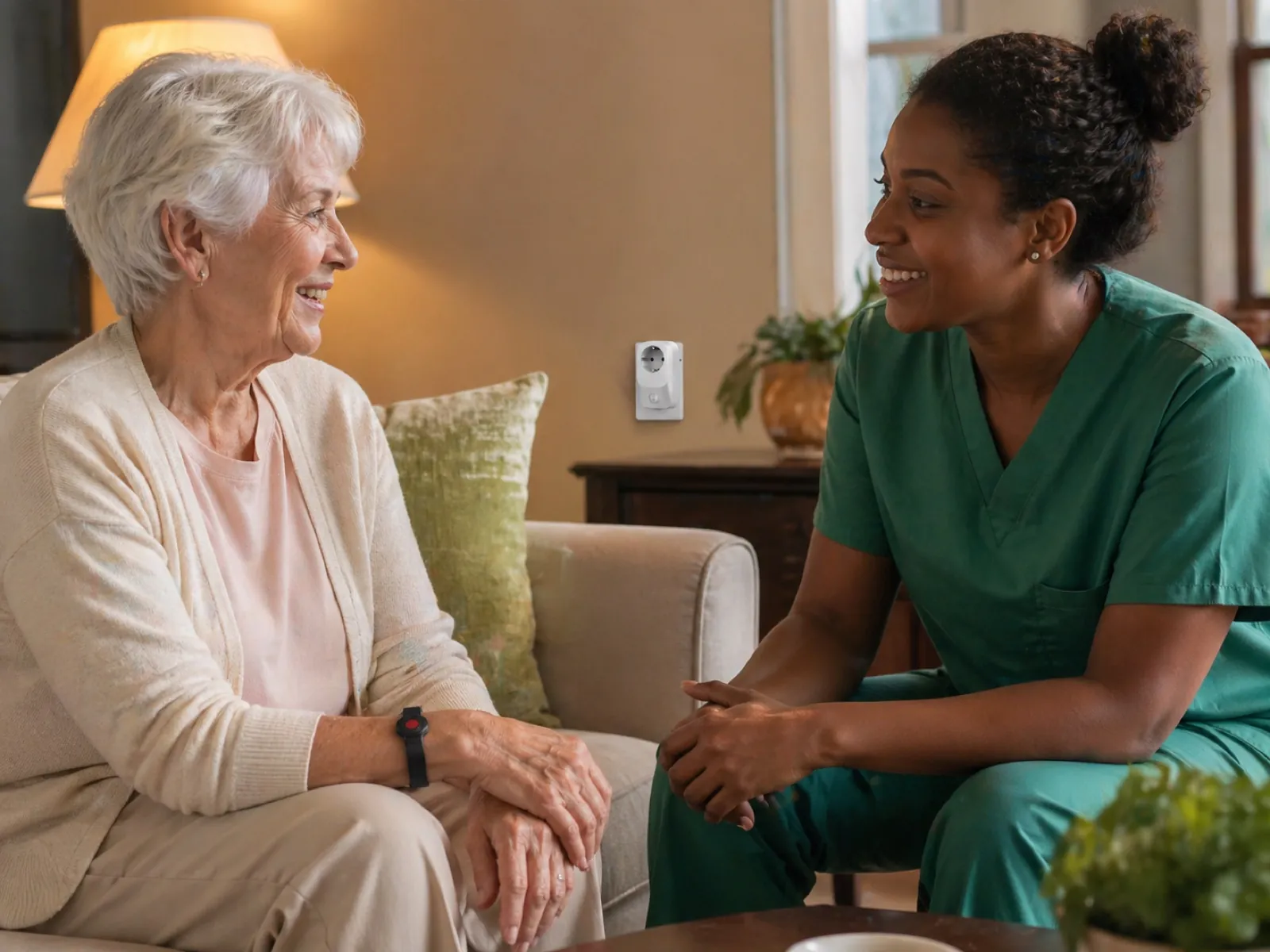
Uniformed professional caregiver chatting with an older woman; warm care home with VitalKeep sensor plugged in

For care professionals

VitalKeep is also for care homes.

If you run a care home, a tele-assistance service or home care, VitalKeep alerts you only when someone needs to step in.

  • One resident, multiple carers

    Each person has their circle: family, staff and management. The alert reaches everyone's phone.

  • Calls in order

    With calls turned on, if nobody attends an SOS or a fall, the phone contacts are called one after another.

  • No works or installer

    Plug in a sensor in each room and that's it. No wiring, no training, no installation cost.

Talk to sales →

Now available with Alexa

Closer, with Alexa

If they have an Alexa at home, VitalKeep can use it to stay closer: it asks if they are okay when an alert goes off, says out loud the messages you write to them and, if they say "Alexa, help", lets you know. Amazon has approved the skills. It is optional and we switch it on with each family: write to us and we will help you connect it.

VitalKeep app: screen for writing a message that Alexa will say out loud

What people ask us before getting started.

Do I need special WiFi?

No. The plugs connect to your normal home WiFi (2.4 GHz), like any other device.

How much does it cost?

The subscription is €25/month per home, with every carer included and a 30-day free trial. The wristband (€30) and the plugs (€60 each) are paid once. No commitment.

What if the power goes out?

During the outage the plugs send no data and the app shows it as "no data". The wristband runs on a coin cell and stays on. When the power is back, everything carries on by itself.

How many plugs do I need?

We recommend one per main room: living room, kitchen, bedroom and bathroom. In most homes, three or four plugs are enough.

What if my family member doesn't want to use a phone?

Yes. Your loved one only wears the wristband. The app is for you and the rest of the family.

Can multiple family members see the data at once?

Yes. Each family member has their own account and gets the alerts on their phone. All of them are included in the subscription.

Who gets the alert when the button is pressed?

The whole family gets the alert on their phones straight away. If you have calls turned on and nobody attends it in the app within 45 seconds, VitalKeep phones the family contacts, one after another.

And when they leave home?

The wristband's SOS button also works away from home, through the linked phone they carry. If the family turns it on, you see on the map where they are and their route of the day, with the stops and the approximate street of each one.

How is location shared?

In two ways: the older person's phone shares where they are, and each family member can share theirs in the family circle. Always with consent. Location is kept for 30 days and, at home, it only says "at home", with no coordinates.

How is it different from button-based telecare?

Button-based telecare connects to a 24-hour call centre when the person presses the button or, with optional sensors, when alerts go off. VitalKeep alerts the whole family on their phones for a fall with impact, an SOS or too long without movement, and for falls nobody needs to press anything. It has no team of professionals: the call centre is you and your family. It costs €25/month per home, with no lock-in. The sources are in the comparison.

How long does it take to set up?

About 15-20 minutes, no technicians. The app guides the setup step by step: the home wifi and one plug per room, the wristband, the person's phone if they go out (optional) and the invitation to the family.

Start being at ease today.

Set it up in about 15-20 minutes. No installers, no works.

No commitment · 30-day free trial · Spanish-speaking support

Get started 30-day free trial · No commitment
Get started